You already own more sounds than you could use in a lifetime. Sample Miner reads the folders you have, works out what is inside them, and hands back drum kits, instruments, and loop sets you can play immediately. Nothing to tag. Nothing to organize.
Discovery
How it works
Point Sample Miner at your folders and it starts reading. Filenames and folder structure come back instantly, so the library is usable straight away. The audio is analyzed in the background, filling in the key, tempo, and character no filename ever recorded.
It works on libraries with hundreds of thousands of samples across terabytes of drives. Every collection comes back with a verdict. This folder is a drum kit. That one is a playable instrument. These are loops at 124 in F minor.
- Whole-library classification. No tagging, no naming conventions, no setup.
- Every sample judged three ways: its format (one shot, loop, multi), its musical content (note, chord, unpitched), and what the group it belongs to adds up to.
- Filename analysis is instant. Audio analysis runs behind you and never silently overwrites what the path already told it.
- Reads the two and three letter codes sample vendors use without explaining, so
KKandSNandHHland in the right place. - Detects the source brand and model where the library names it.
Dashboard
All the samples on your hard drive at a glance. Hover over a category for the breakdown. Your recent samples, drum kits and instruments are there to browse and resume.
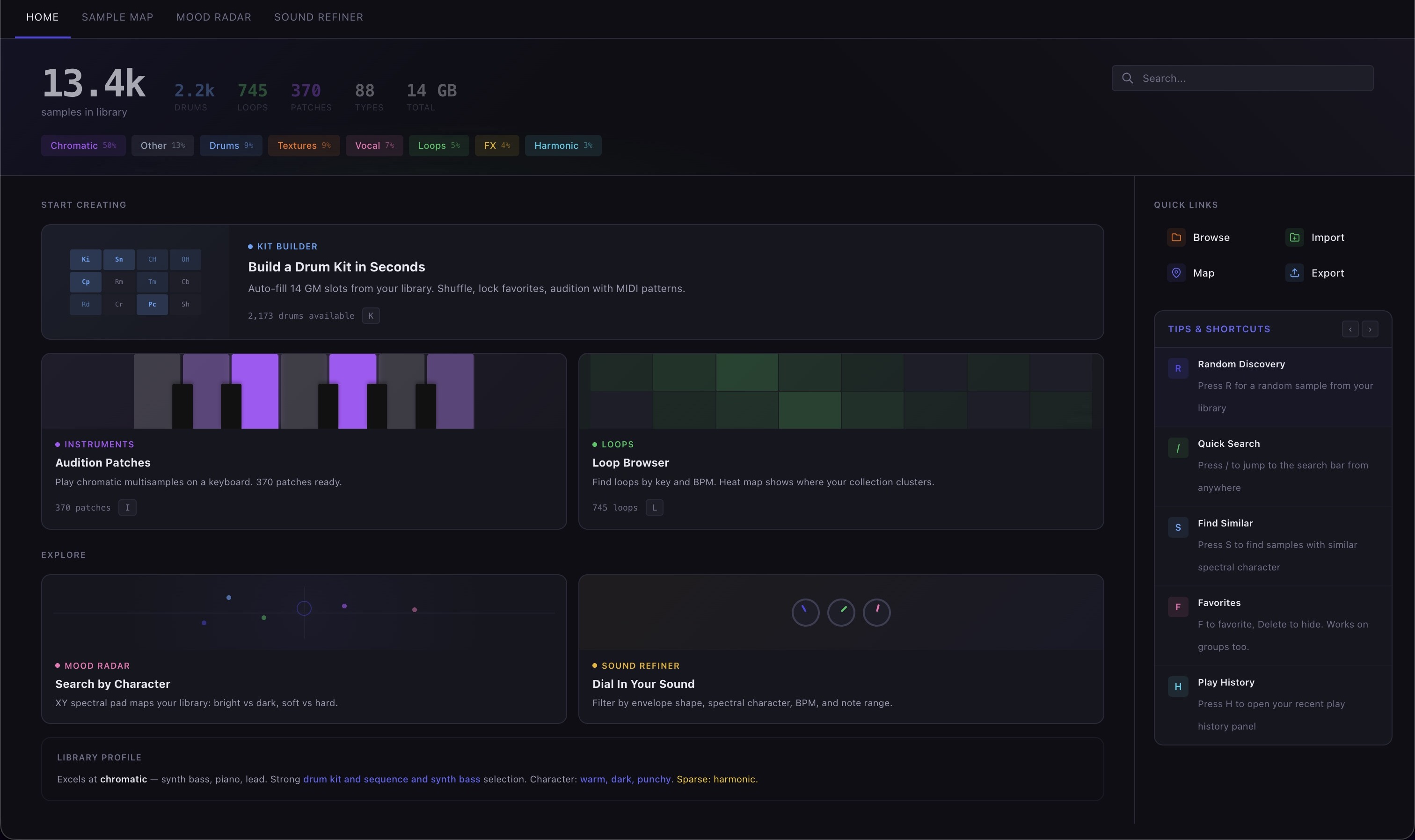
- Library totals and composition at a glance.
- Recent jams, kits and instruments on the front page.
- Your jumping-off point into every other view.
Sample Map
Sample Map shows you the big picture first, then lets you click down one layer at a time.
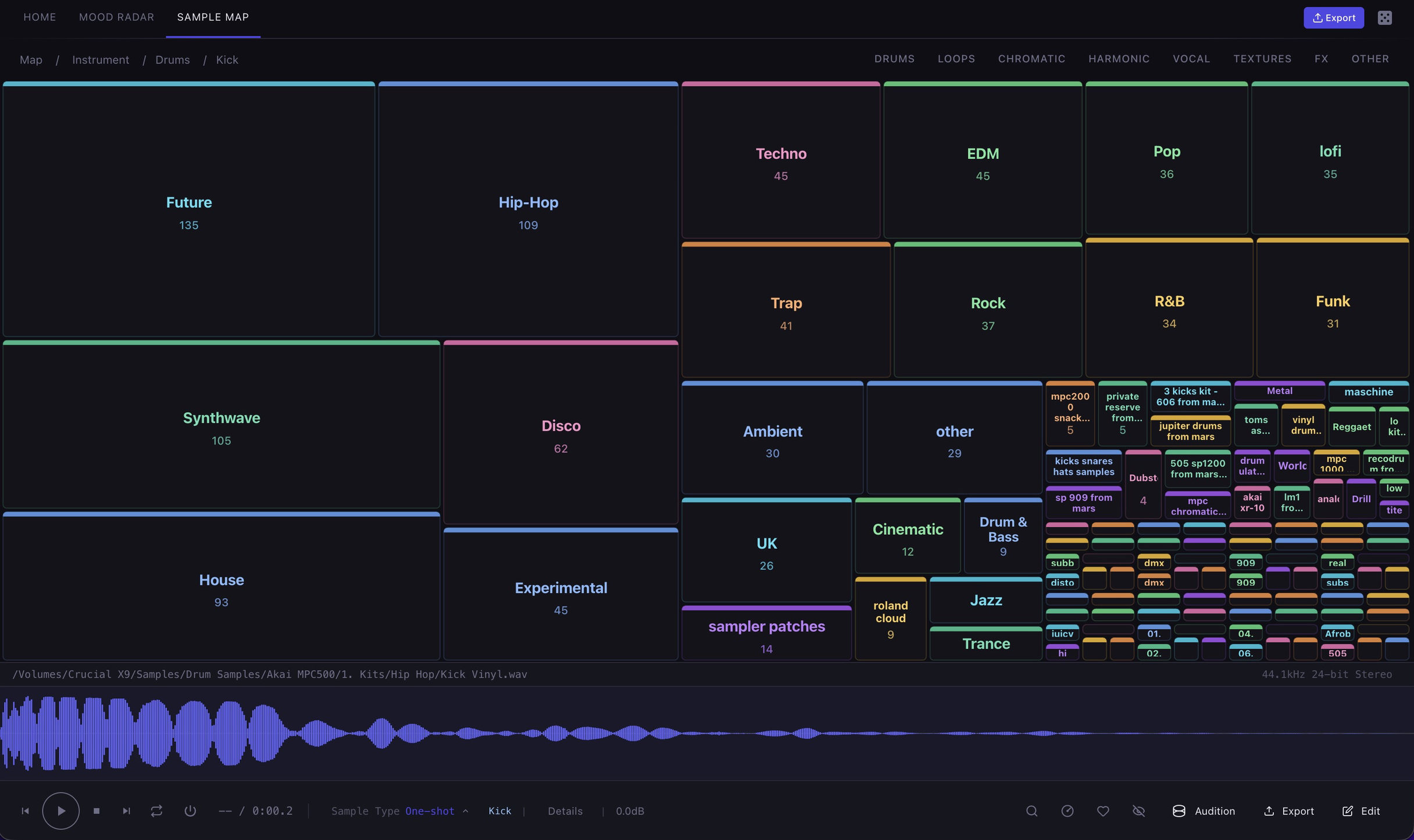
Navigate your sample library by:
- Instrument — kicks, snares, pads, brass, whatever the library holds.
- Genre — how much of your collection is house, hip hop, cinematic.
- Tempo — where your material actually sits, and where it does not.
- Key — everything in F minor in one place.
- Character — bright, dark, punchy, soft, warm, thin.
- Type — one shots, loops, multisamples.
- Category — the broad shape of the library.
- Folder — the structure you already have, if you would rather start there.
Mood Radar
Mood Radar plots your samples by how they actually sound and lets you move through them by feel. Pick one you like and see what's similar.
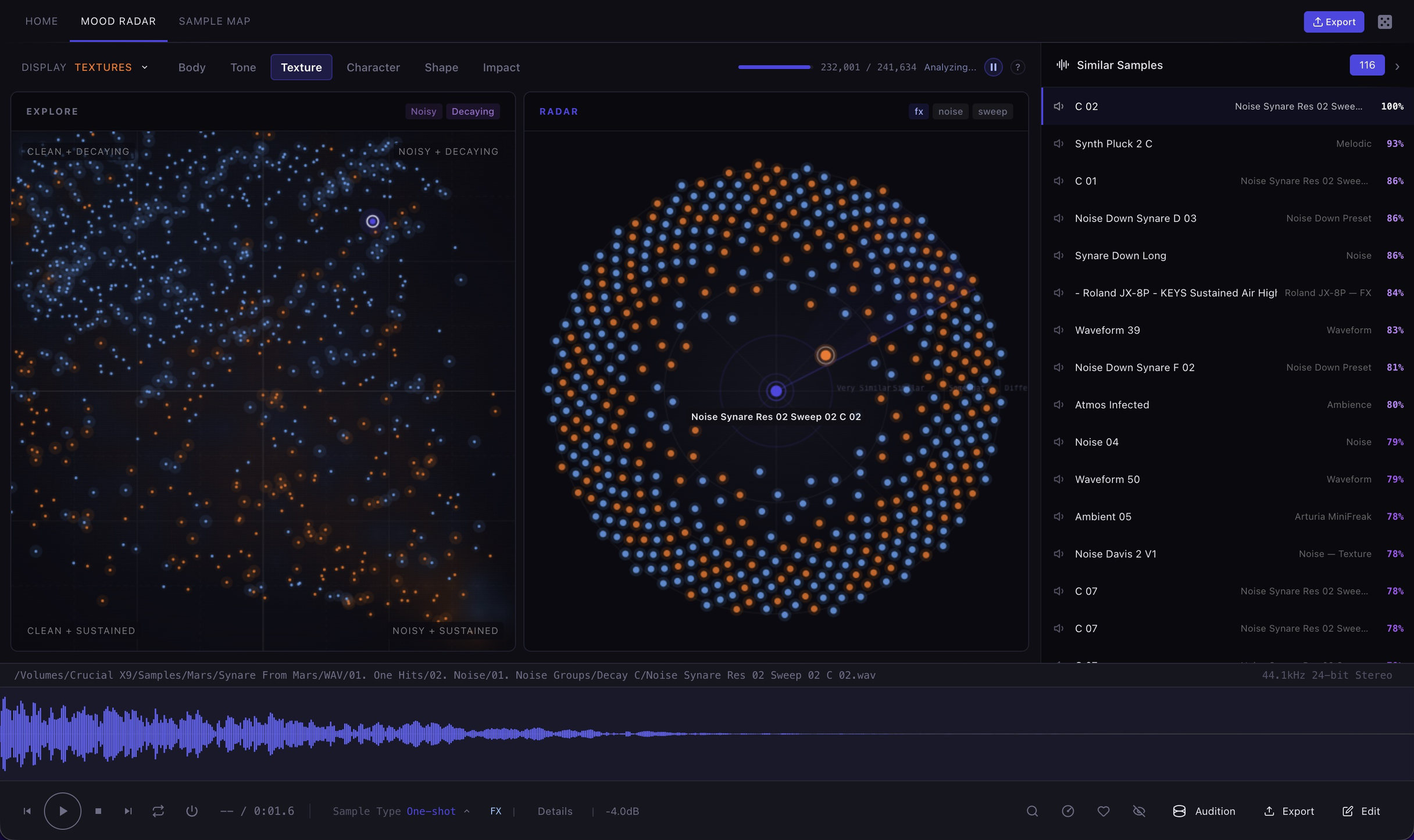
- Two views of the same space. The map lays the library out by sound, and the proximity radar puts one sample at the centre with its nearest neighbours around it.
- Find Similar ranks the whole library against any sample you choose.
- Character tags come out of the audio: bright, dark, punchy, soft, warm, thin.
Search
Search finds your samples by more than just their filename: key, tempo, root note, chord, type, genre, character, sample pack and brand, all with intelligent autocomplete.
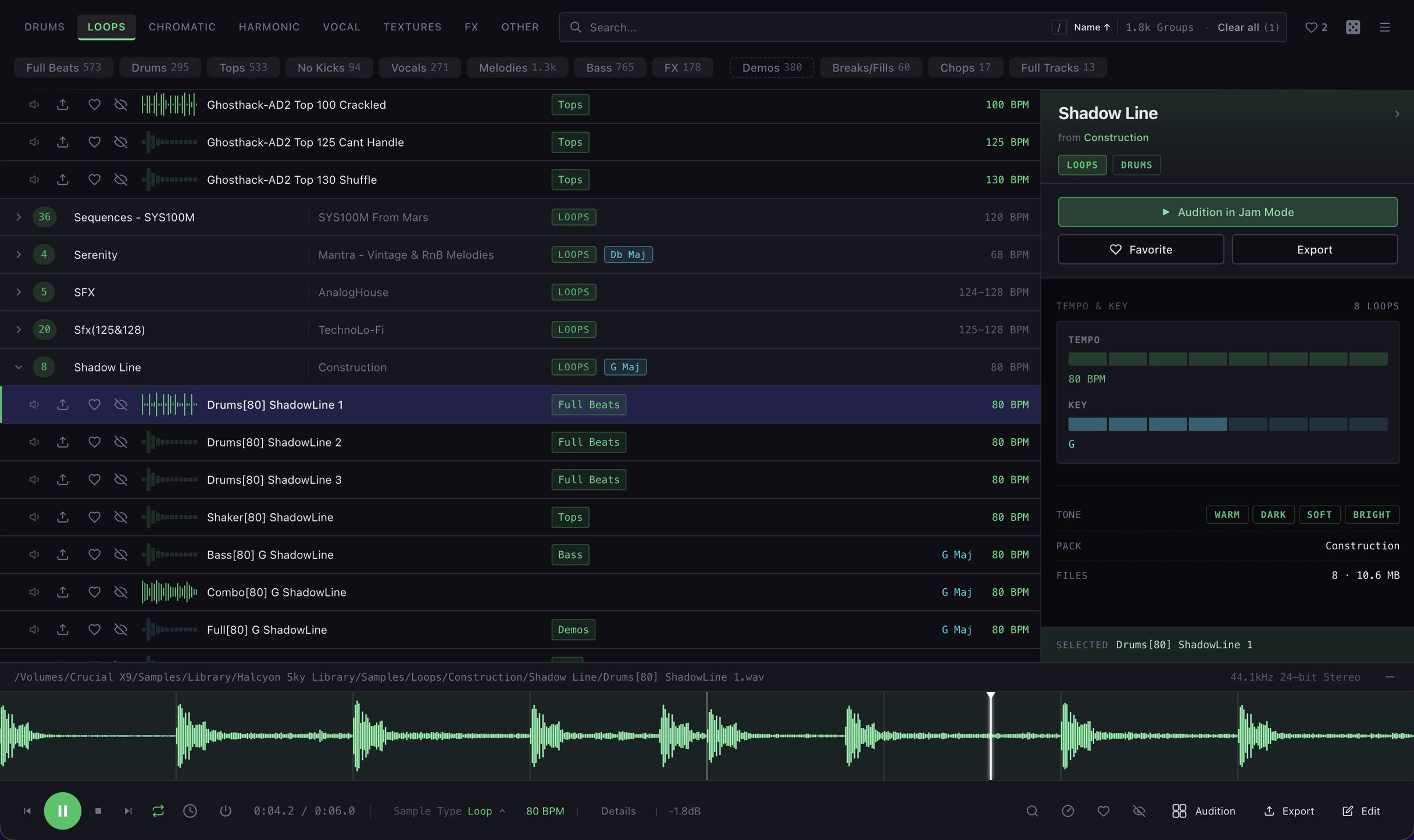
- Filter by key, tempo, note, chord, sample type, group type, genre and character.
- Combine filters, then carry them straight into any other view.
- Autocomplete built from your library, not a preset vocabulary.
- Results grouped by pack, with tempo and key shown inline.
Loop Browser
Navigate your loops with a heat map of your library by tempo and key, to quickly filter any sample down to its key and BPM.
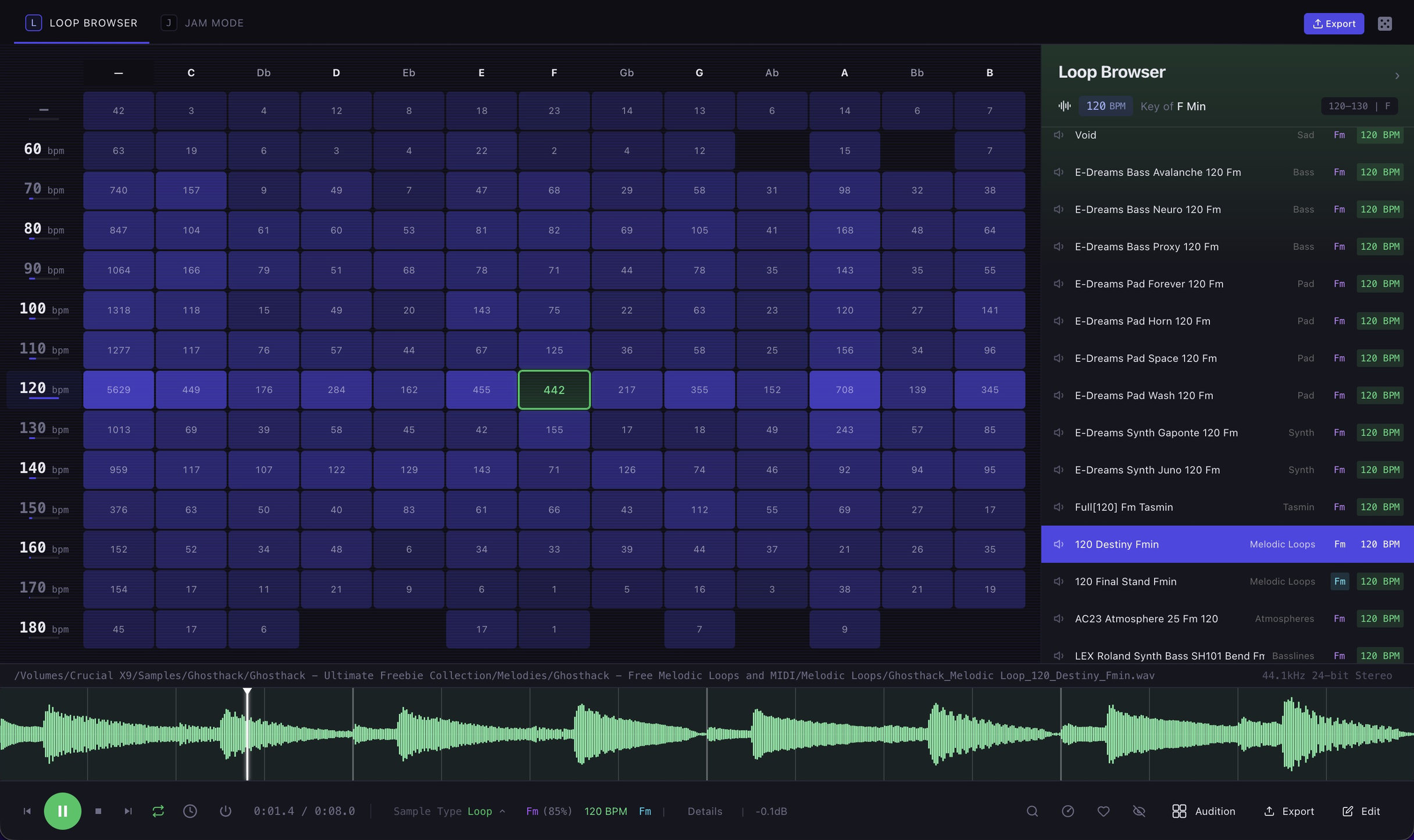
- Every loop you own placed by tempo and key, brightest where you have the most.
- Pull out sets that already agree on key and tempo.
- Tempo read from filenames where written, estimated from audio where not.
Instruments
Sample Miner identifies the notes and velocity layers, and turns them into a playable instrument automatically. Point it at your sample library and you might discover that 1,481 forgotten folders contain 1,605 instruments, already mapped across the keyboard and ready to play. No renaming. No dragging. No tedious setup.
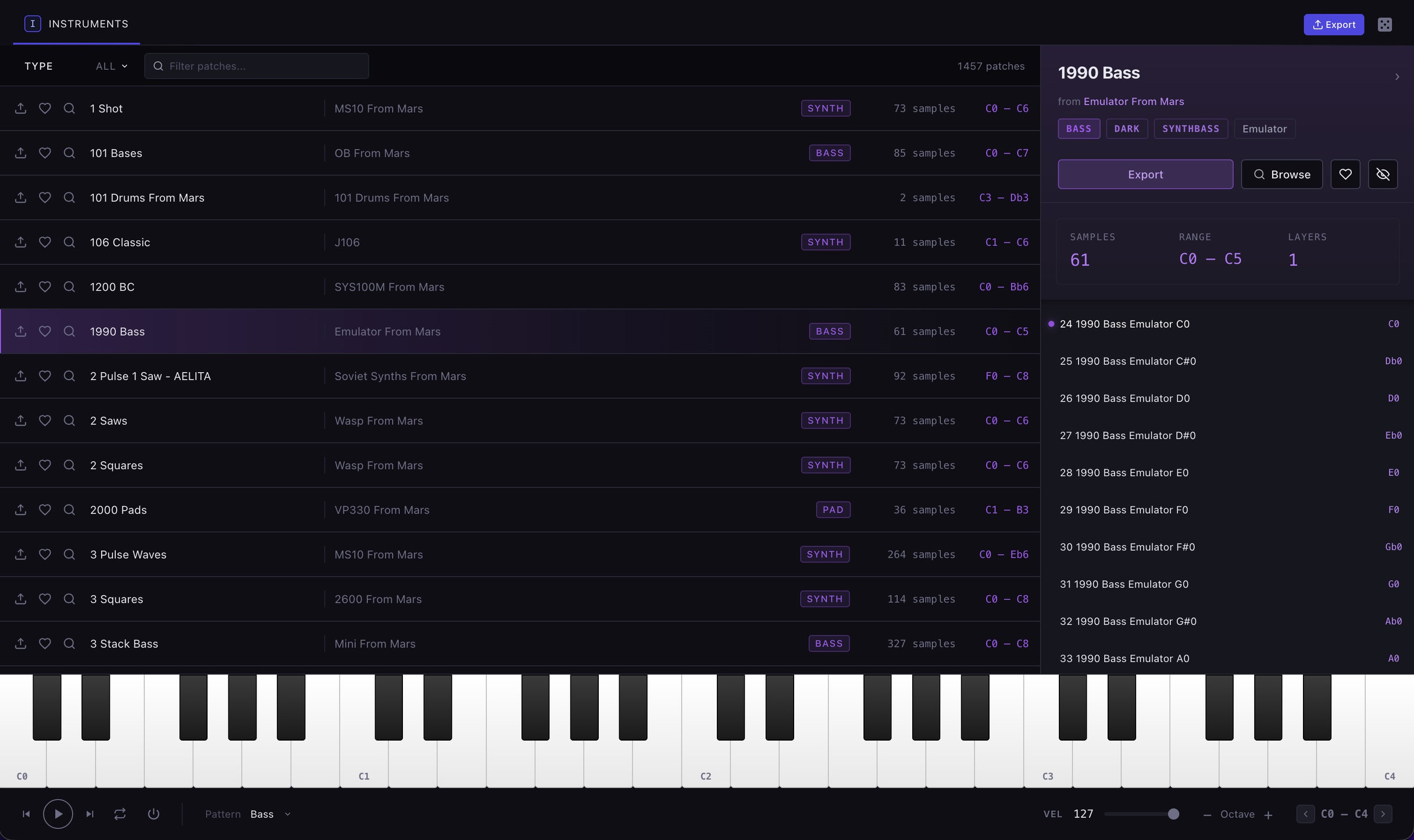
What it reads out of a filename
- Notes in any of the ways people write them:
_C4,_C#3,-D,_Eb,(A#2),_G1. - Velocity layers, whether they are labelled —
_vel127,_v64— or just numbered:_127,_64. - Both at once:
_C4_vel64,_127_G1. - Round robins:
_rr1,_RR01. - Which number is which. An explicit
v64is always a velocity. A bare number on unpitched material is read as a velocity unless there are more than ten of them, because nobody samples every velocity layer. - When to say no. It wants three samples and two real variations before it calls something an instrument, so a folder of alternate takes does not become a patch.
- Files with no note names at all are mapped around C4 with the interval worked out from how many there are, then confirmed by pitch detecting a few of them.
Splitting Multisamples
Sample Miner turns a single recording of an instrument into a playable multisample: counting the regions the moment it sees the file.
Split it and every region becomes its own sample, pitch detected to find out what note it actually is, mapped across the keyboard, and handed back as an instrument you can play and export like any other.
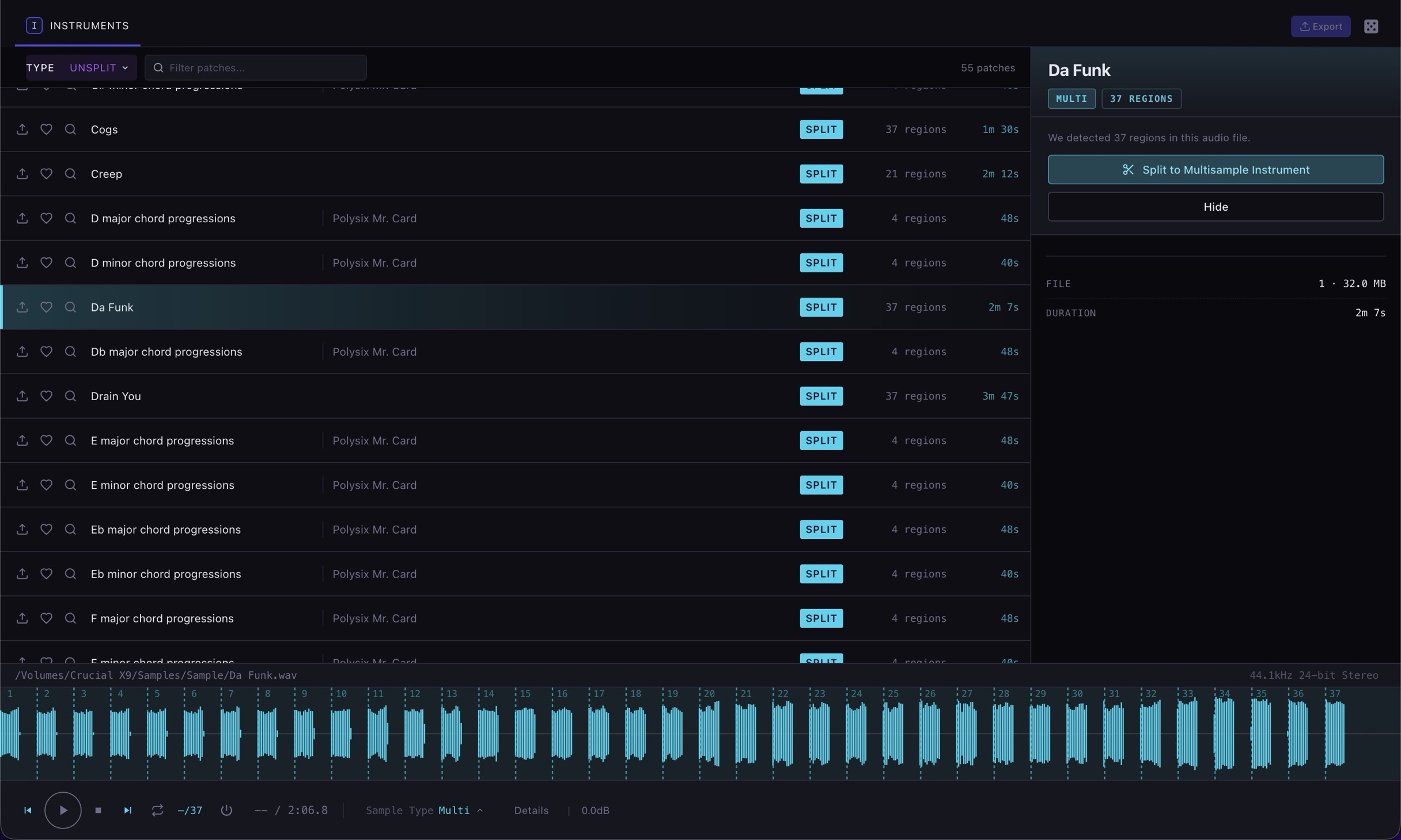
- Regions found on the silence between notes, with the count shown before you commit to anything.
- Every region pitch detected, so the mapping comes from the audio rather than a filename that never said.
- Preview region by region before splitting.
- Normalize and trim silence on the way out.
- What lands is an ordinary instrument. It plays on the keyboard and exports to every format on this page.
Kit Builder
Turn thousands of one shot drum samples into real drum kits you can audition in seconds, mapped to General MIDI, from organized kits and one shots scattered across your hard drive.
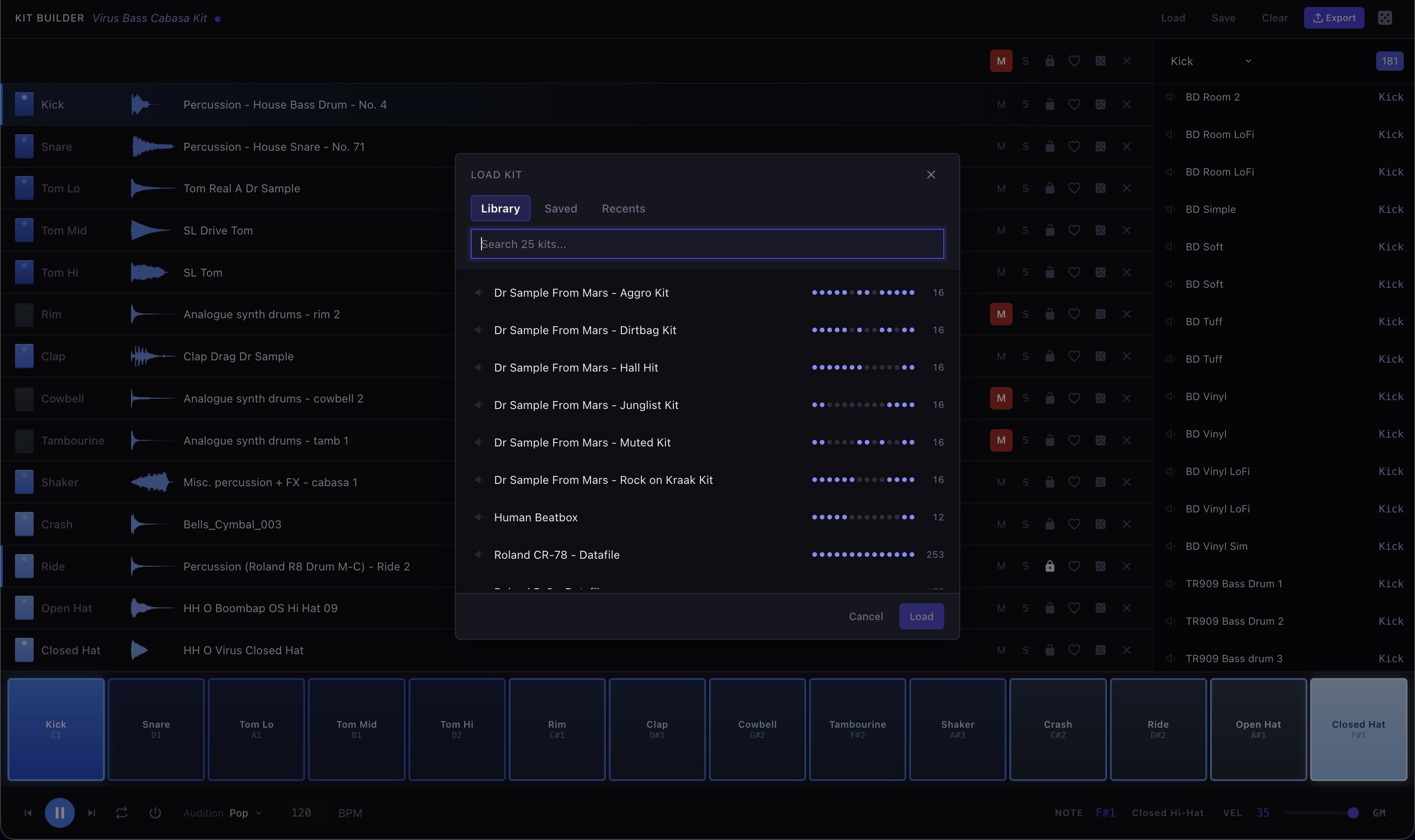
- Drum kits mapped to General MIDI, playable immediately.
- Random fill for when you want a starting point rather than a decision.
- Lock what works, shuffle the rest.
Live Sets
Jam Mode builds sets of matching loops you can audition directly from your computer keyboard: adding, removing, soloing and muting layers as you go.
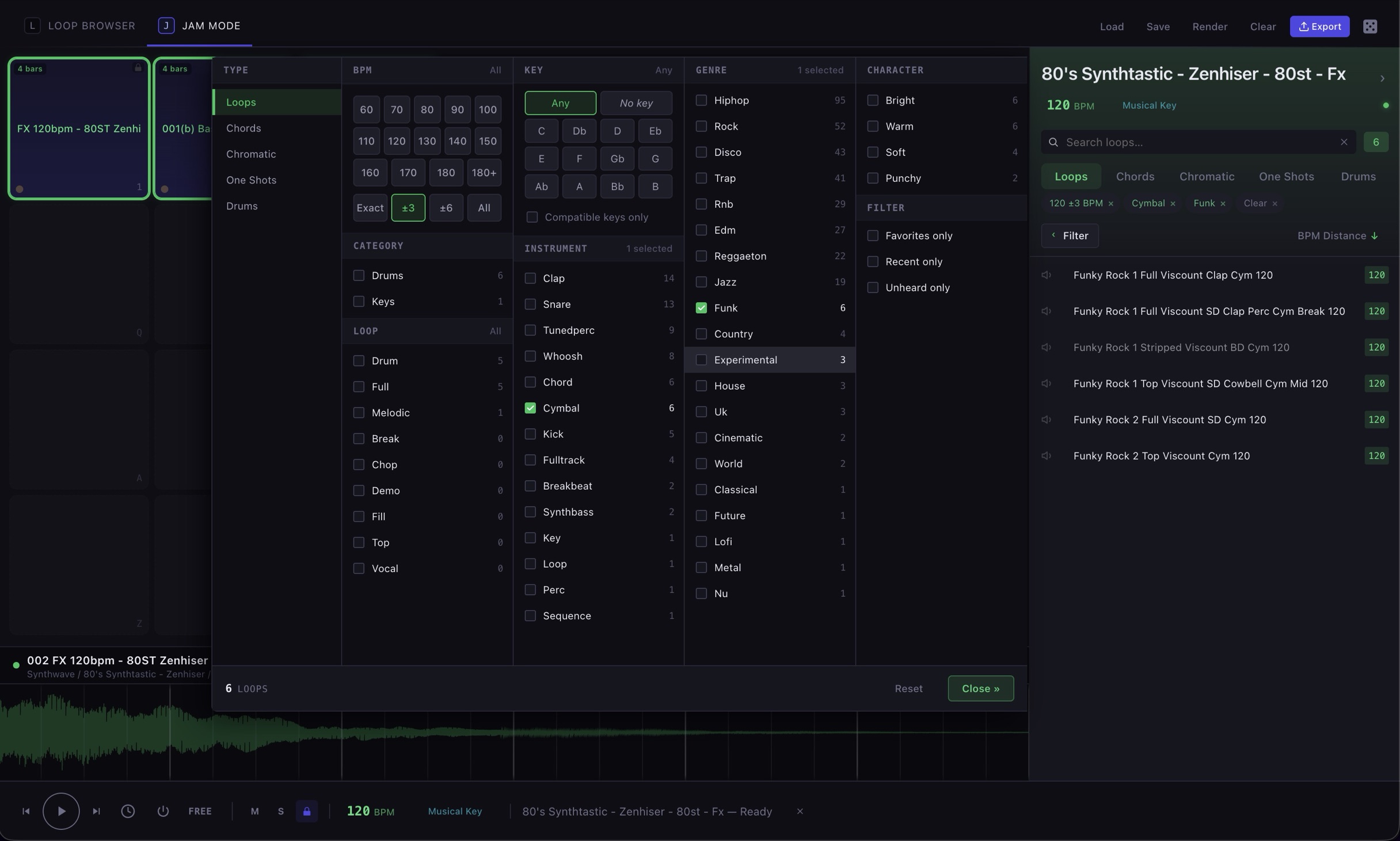
- Loops from anywhere in the library on one set of pads, held together at a single tempo.
- Play the set from the keyboard, hands free of the mouse.
- Lock the pads that are working before you go looking for the next one.
- Take the whole set into Jam Mode to render or export it.
Randomizing
Random discovery and happy accidents: two sounds you would never have put together, a pattern that came out wrong and turned out better, a loop you only heard because it was next in the folder.
The random button is wired through Sample Miner wherever an accident is worth having. Making a beat? Roll the dice for a whole new kit. Keep the kick and the snare, lock them, and roll again for the rest.

- Kit Builder — fill an empty kit at random from your library. Lock the pads that work, shuffle the losers, and keep rolling until the kit is yours.
- Beats — randomize a whole pattern or a single row. Mutate adds or removes hits on the rows you have not locked, so a groove drifts rather than starting over. Everything stays editable, so you can also build a pattern from scratch and keep it.
- Jam Mode — start from a random loop and follow what it matches.
- Search — press
Rto play a random sample from whatever you have filtered to. Narrow it to 124 BPM in F minor first and every roll is already in key.
Auditioning
Every view in Sample Miner plays. You are never more than a click or hover away from hearing whether it works.
Beat grid
The beat grid plays your kit against thirteen genre patterns, so you hear it the way you are going to use it. You can create your own patterns, mutate existing ones and adjust tempo and swing.
Roll a single lane and you get something a drummer would play: hats that behave like hats, kicks that land where kicks land. Then, now and again, it hands you something nobody would have written on purpose, and that is the one you keep.
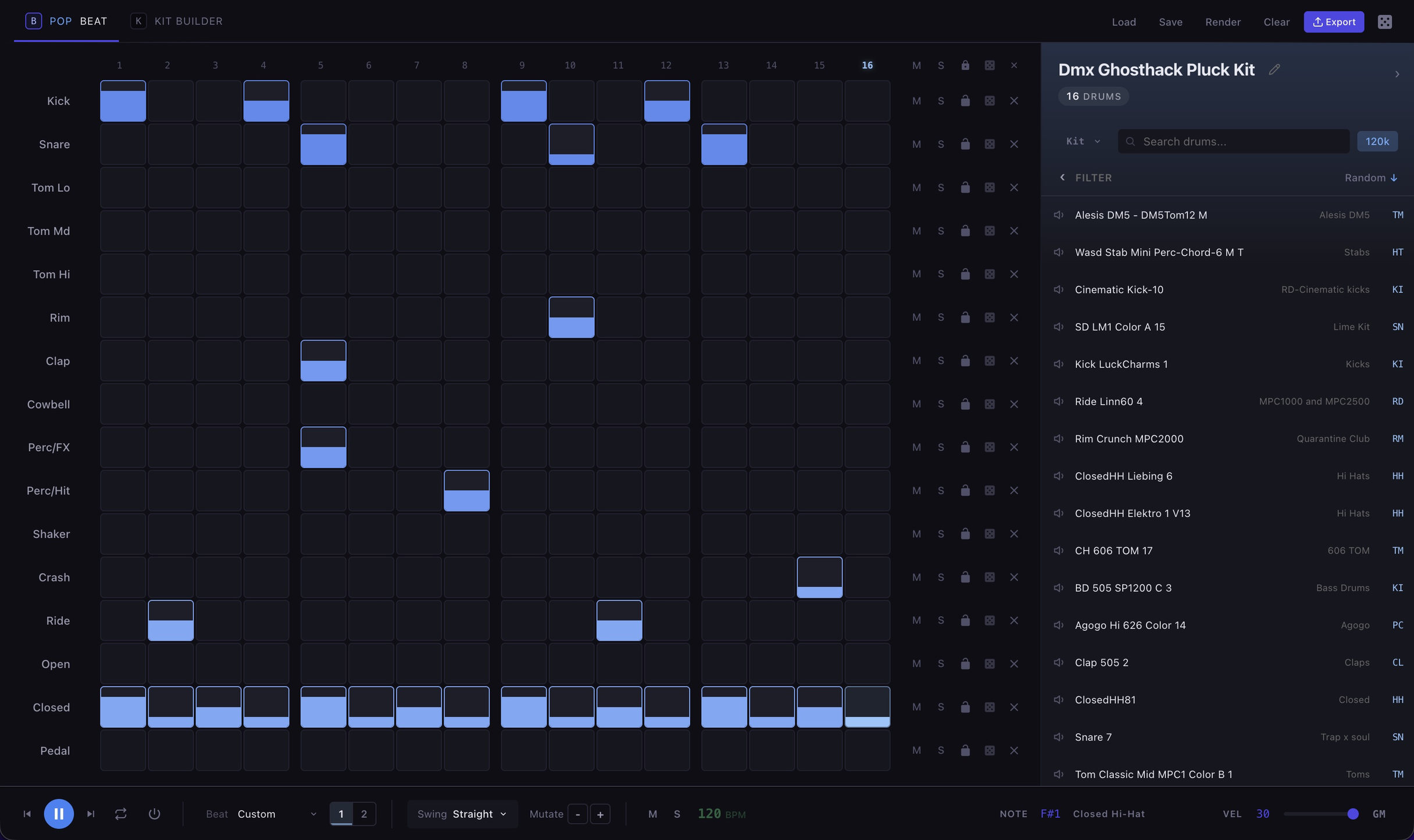
- Swap samples and hear the change in context, not in isolation.
- Write your own patterns, or mutate one of the thirteen until it is yours.
- Tempo and swing on whatever you are hearing.
- Randomize a lane and get a part that fits the drum, not noise.
- Lock the lanes that are working and keep rolling the rest.
Jam Mode
Jam Mode is where you explore what loops fit together for a live set.
Drag loops and one shots onto the pads from anywhere in the library. They are time stretched to the jam tempo and pitch shifted into the jam key on the way in, so a 96 BPM break and a 124 BPM pad play together without you doing the arithmetic.
A beat you built in Kit Builder loads into a new jam in one click, already under the loops.
When the arrangement is right, render it down to a single WAV, or send the pads to the export queue and out to your sampler.
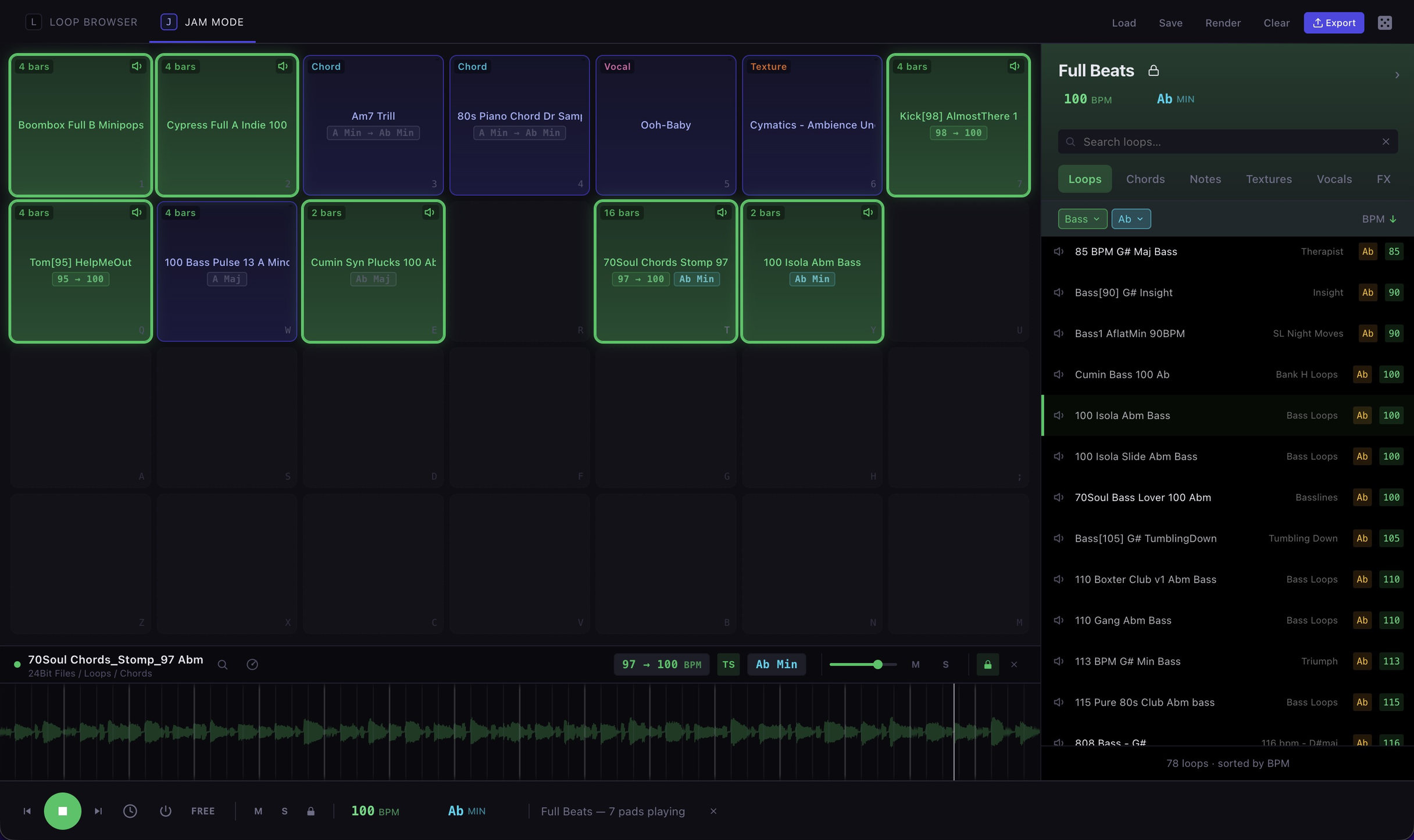
- Loops and one shots dragged onto pads from anywhere in the library.
- Automatic time stretch and pitch shift, so material that never agreed on tempo or key plays together.
- Per pad mute, solo and lock. Build and strip the arrangement live.
- The full grid mapped to the computer keyboard.
- A Kit Builder beat loaded into a new jam in one click.
- Render the mix to a single WAV, or send the pads to the export queue and on to your sampler.
Instrument Mapping
The mapping is already done. The keyboard is where you find out whether it is any good, because mappings fail quietly and a patch can look complete with one sample stretched across two octaves where it falls apart.
Keys with a real sample behind them are marked. Keys borrowing from a neighbour are marked differently, and by how far. Play it, hold notes, run chords, and hear where it thins out before you export it to anything.
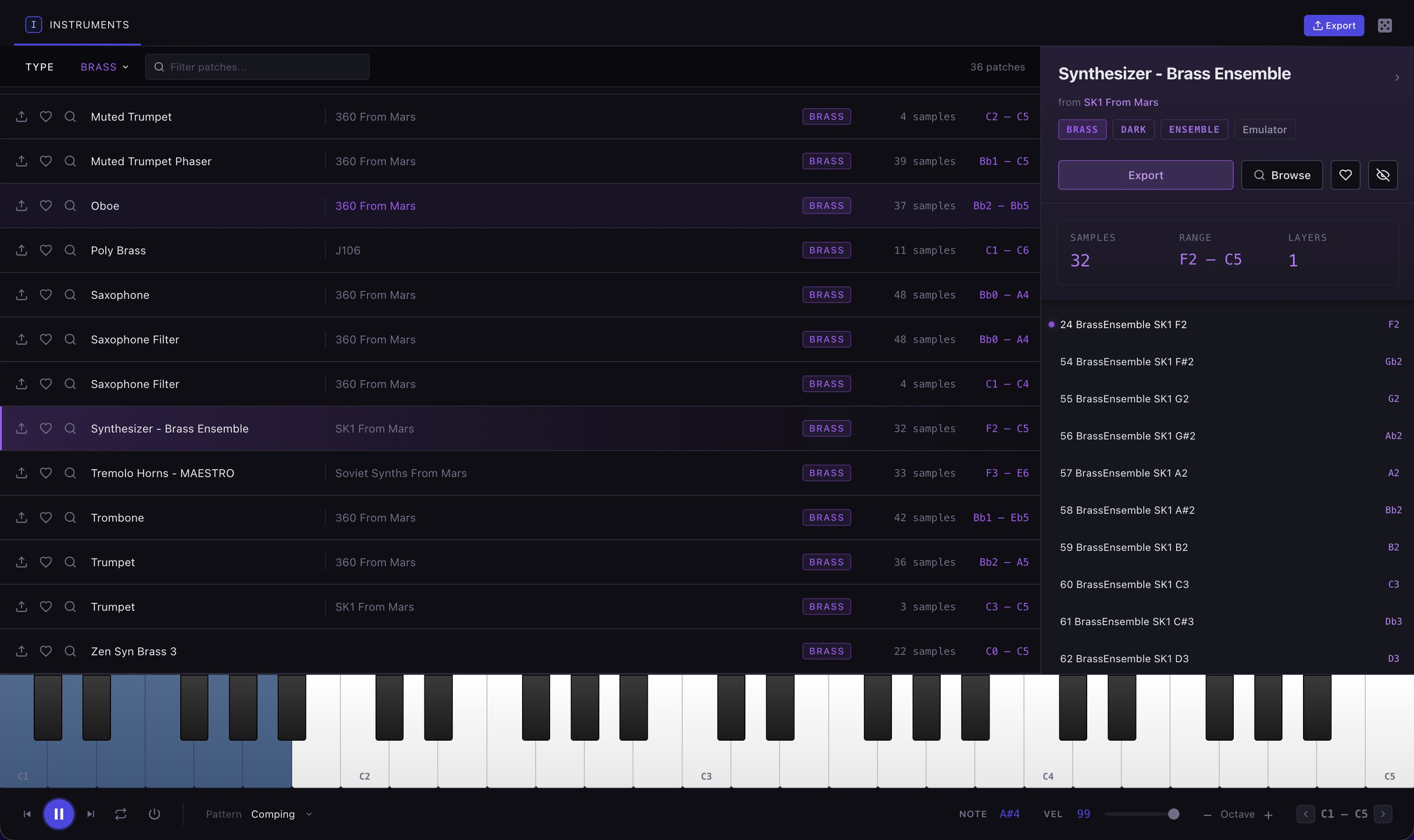
- See which notes have samples and which are pitch shifted, and by how much.
- Velocity layers shown stacked per key.
- Play from the computer keyboard or by clicking.
- Held notes, chords, arpeggios and random patterns.
Editing
The sample editor allows you to trim silence, fine tune loop points and normalize audio. Edits are staged and applied on export so your original samples remain intact.
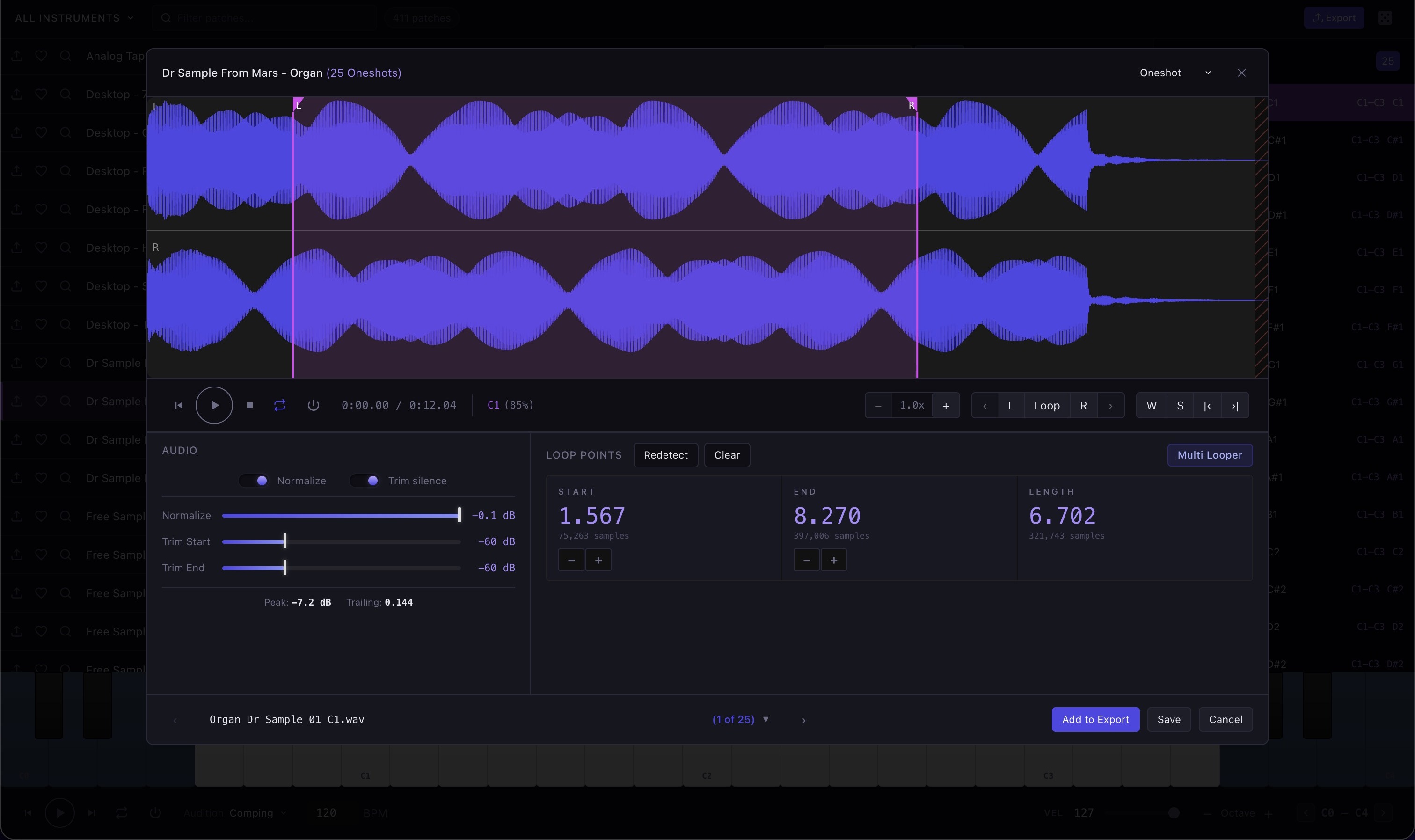
- One shots: start and end markers, pitch detection, drum type with manual override, character and genre tags.
- Loops: loop start and end, crossfade, tempo detection with override, key and mode.
- Multis: the whole waveform with its regions, splitting on detected gaps, per region preview, batch export to separate files.
- Canvas waveform with zoom and scroll, and keyboard shortcuts for everything.
- Apply to All pushes tags, type and properties across a whole selection, because libraries arrive wrong in batches.
- Non destructive throughout. Edits are stored against the sample and rendered on export, into
~/Music/Sample Miner/, never over the source file.
The auto looper
Finding a clean loop point by ear means zooming in, guessing, listening for the click, and moving the marker again. For one sample it is tedious. For a forty sample instrument it is an evening.
Autolooper uses four different algorithms to find the best loops for you. It runs on the whole instrument at once: all thirty eight notes get loop points set and graded so you can adjust the outliers.
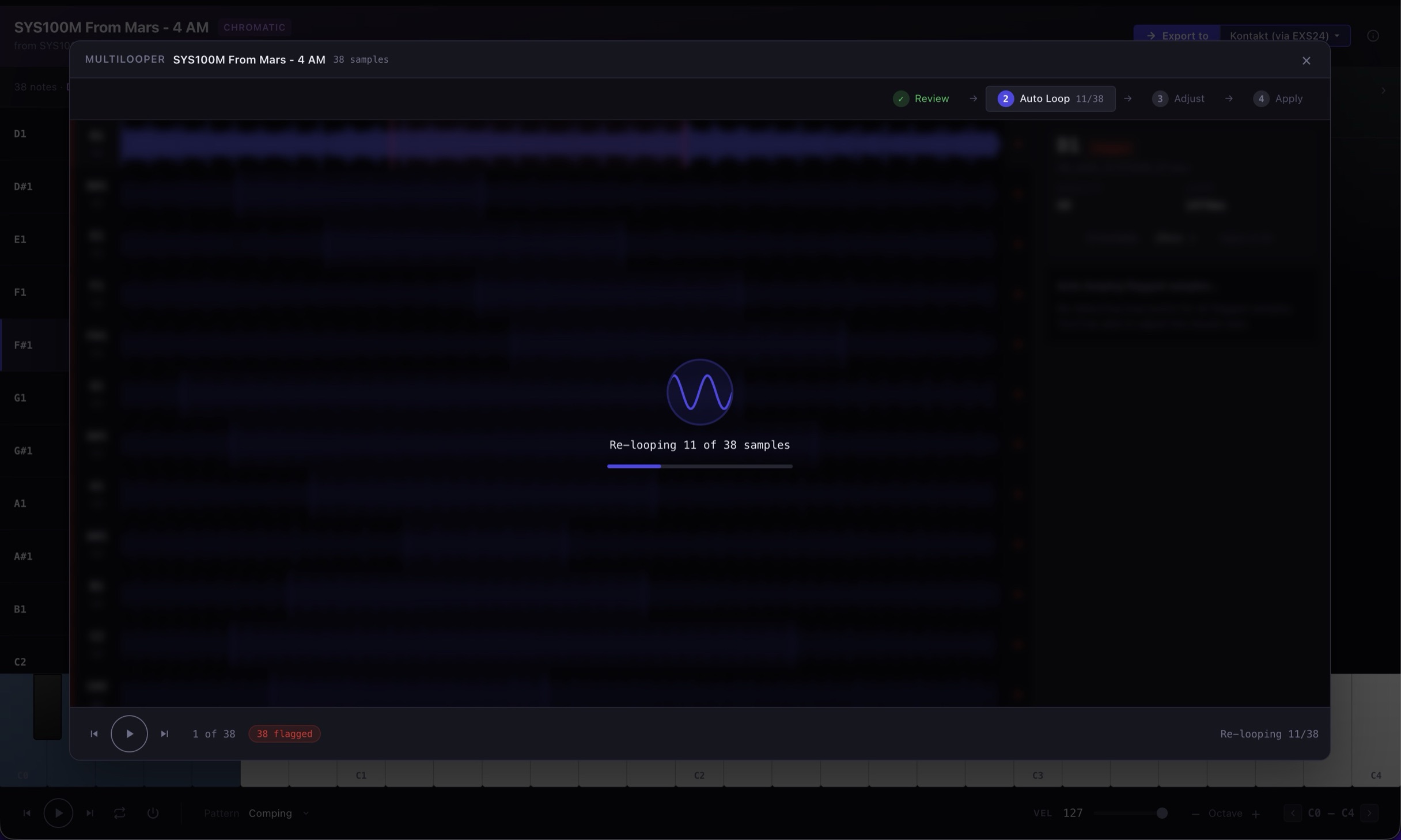
The four algorithms
- Correlation matches repeating waveform patterns. Sustained tones, pads, drones.
- Spectral matches by frequency content instead. Complex and evolving sounds where the waveform never repeats exactly.
- Beat-aligned uses the detected tempo to land on a musical division, a quarter, a half, a bar. Rhythmic material.
- Auto reads the envelope, the transient density and any tempo hint, then chooses one of the three.
- Every result is rated from excellent to poor, so a bad loop tells you it is bad instead of surfacing later on the hardware.
- Runs in the background so the app stays responsive while it works.
Exporting
Finally, Sample Miner exports your samples to for compatibility with a dozen different hardware and software samplers.Normalize, detect pitch, and find loop points on the way out, in one pass, in the background, at whatever scale you queued.
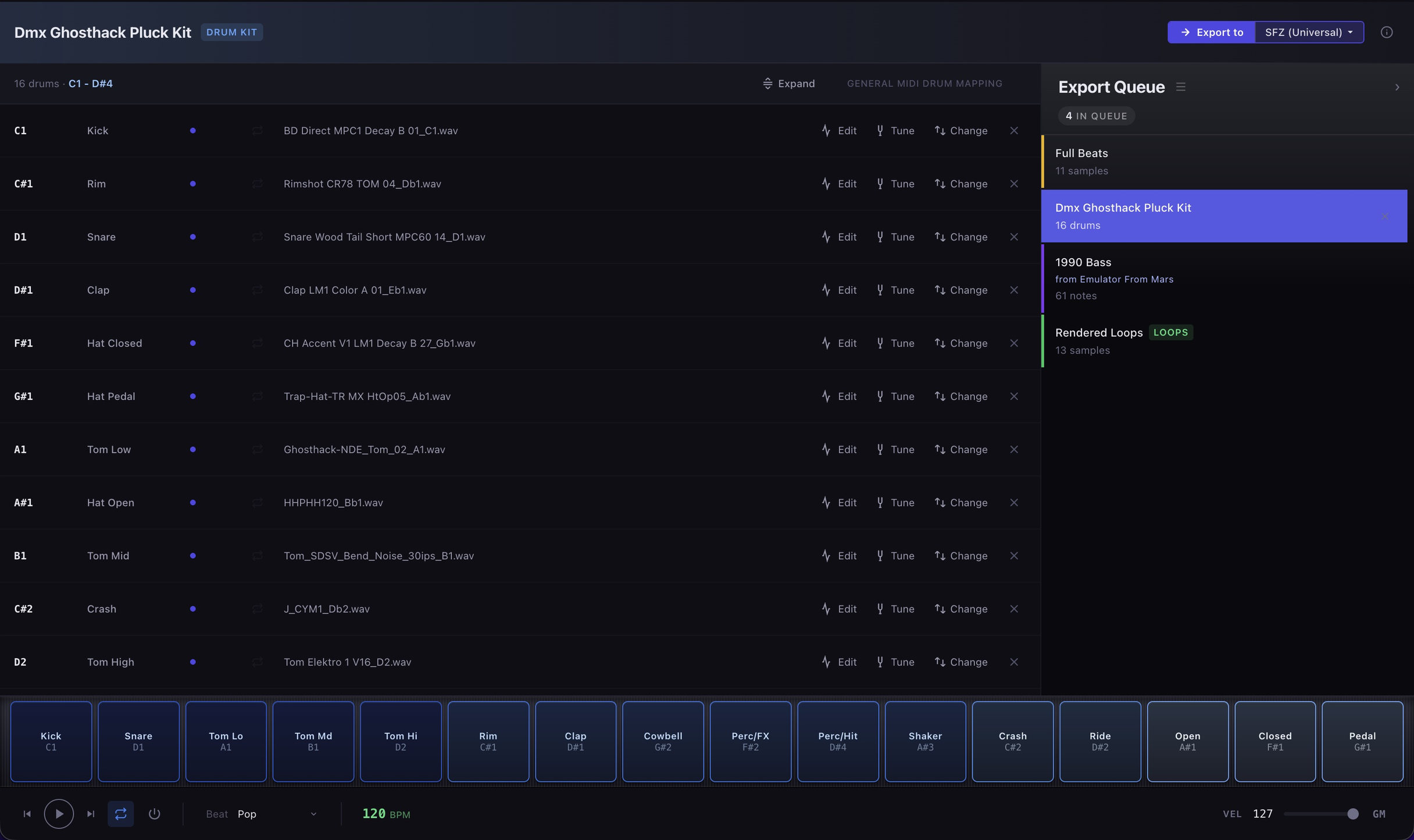
Formats
| Logic EXS24 | Written natively here. Logic's own format, and the one Sample Miner reverse engineered rather than converted. |
|---|---|
| Akai MPC XPM | Keygroup programs, up to four velocity layers per key. |
| SFZ | Open, readable text. Plays in sforzando, sfizz, and a long list of samplers. |
| Decent Sampler | Free player on macOS, Windows, and iOS. The one to use when handing an instrument to somebody else. |
| Yamaha X7L | Written here from byte level reverse engineering of the container and validated against reference files. Loop points are not written yet. |
Five more formats are reachable through ConvertWithMoss, a free open source converter that Sample Miner can download and configure for you: Reason NN-XT, Ableton Sampler, SoundFont 2, 1010music blackbox and Kontakt. SFZ is written natively first and handed over as the bridge, so these come from the same mapping as everything else.
Where it lands
- Hardware: Akai MPC and Force. Yamaha MODX, MODX+, Montage and Montage M. 1010music blackbox. Any hardware sampler that reads SFZ.
- Hardware that reads plain WAV: Roland SP-404 MKII. Elektron Digitakt and Model:Samples. Dirtywave M8. Sonicware LIVEN Lofi-12 XT. Teenage Engineering EP-133 K.O. II. These need no instrument file, only the audio at the rate, bit depth and channel count the machine expects, which a named preset sets for you.
- Software: Logic Sampler. Decent Sampler. Reason NN-XT. Ableton Sampler. Kontakt, as an older instrument version. Any SFZ player, and anything that loads SoundFonts.
- Normalize, pitch detect and auto-loop on the way out, in one pass.
- Multis split into separate files. One shot groups processed in place.
- Everything staged under
~/Music/Sample Miner/so you can audition the finished result on the keyboard before it goes anywhere.
Step by step instructions for each format are in the export guides.
Keyboard First
Sample Miner is designed to navigate with your computer keyboard alone, so you can organize and play completely disconnected.
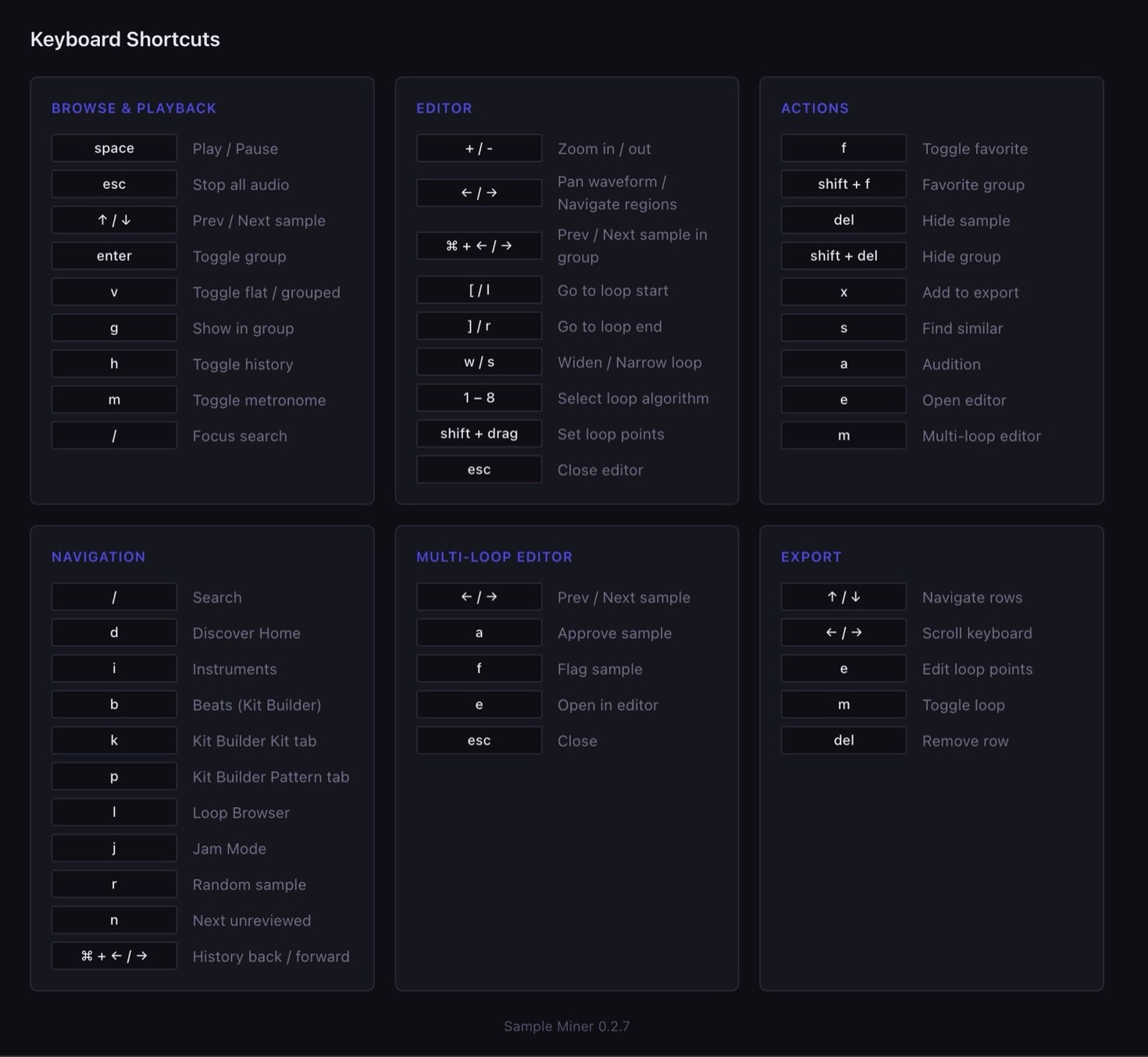
? anywhere for the full shortcut list.- Single keys move you between Discover, Instruments, Loops, Kit Builder and Jam Mode.
- Roll the dice, favorite, hide, find similar, open the editor and start an export.
- Play the keyboard, play the pads, play a beat, all without reaching for the mouse.
- Press
?for the full list.
Other Details
- Move your library and keep everything. Copy your samples to a bigger drive, point the app at the new spot, and every hour of work you have put in is still there. Loop points, favorites, kits, instruments, tags. Nothing to rescan, nothing to re-analyze overnight, nothing to redo. If you pick the wrong folder by mistake, it tells you instead of ruining the library.
- Unplug a drive and nothing lies to you. An offline volume is detected and labeled rather than rendering a library you cannot play.
- Duplicates found without reading every file.
- Nothing is generated. Every sound out is one you already paid for.
- Nothing is uploaded. Your library, your filenames and what you do with them never leave your disk. Analysis makes no network calls.
- No subscription. One-time purchase, $79.
- Signed and notarized, with a real version history.